> ## Documentation Index
> Fetch the complete documentation index at: https://docs.realdealcpa.ai/llms.txt
> Use this file to discover all available pages before exploring further.
# How to Use Real Deal CPA
> Complete guide to using Real Deal CPA's AI-powered real estate investment analysis platform
Welcome to your comprehensive guide for using Real Deal CPA's AI-powered real estate investment analysis platform. This guide will walk you through every step of the process, from creating your account to analyzing investment properties.
 ## Getting Started
### Step 1: Create Your Account
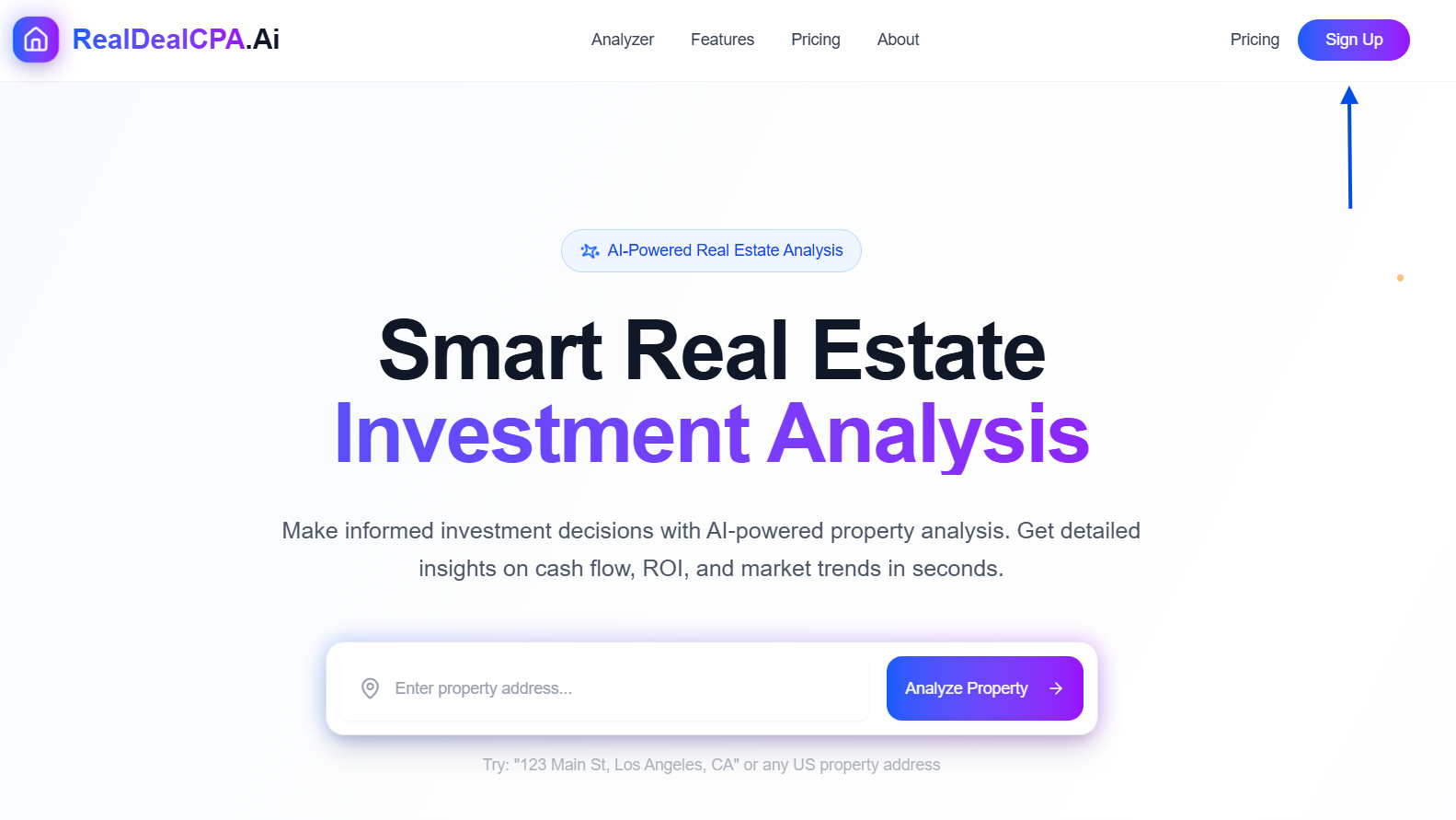
Visit [RealDealCPA.ai](https://realdealcpa.ai) and click the "Sign Up" button in the top right corner.
Fill out the registration form with:
* **Email**: Your valid email address
* **Password**: A secure password for your account
Click "Sign up" to create your account and start your investment journey.
Already have an account? Click "Sign in to existing account" to access your dashboard.
## Getting Started
### Step 1: Create Your Account
Visit [RealDealCPA.ai](https://realdealcpa.ai) and click the "Sign Up" button in the top right corner.
Fill out the registration form with:
* **Email**: Your valid email address
* **Password**: A secure password for your account
Click "Sign up" to create your account and start your investment journey.
Already have an account? Click "Sign in to existing account" to access your dashboard.
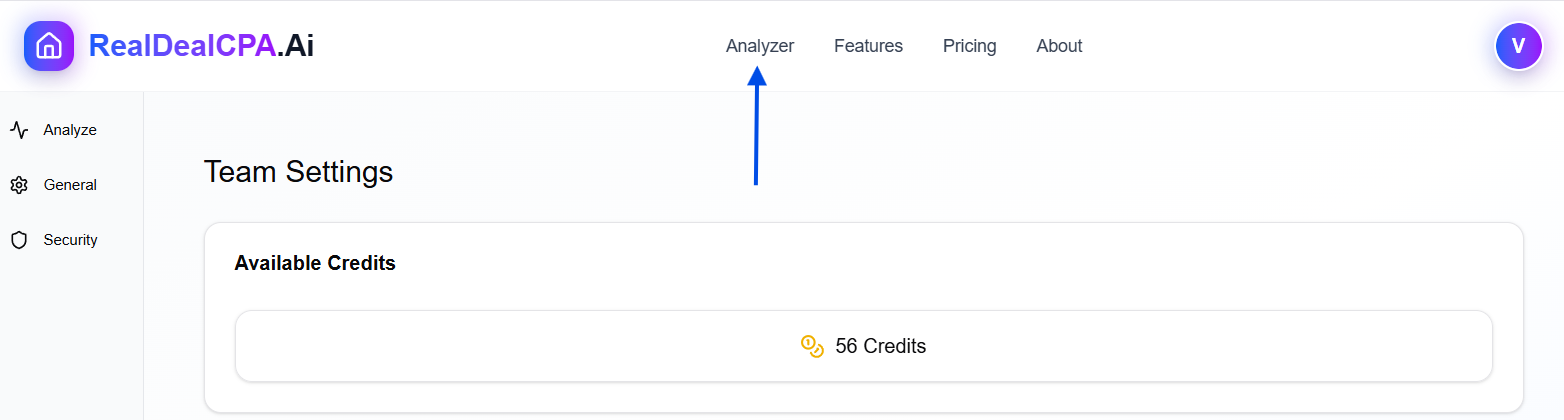
 ### Step 2: Access Your Dashboard
Once logged in, you'll see your dashboard with:
* **Navigation Menu**: Access Analyze, General settings, and Security options
* **Team Settings**: Manage your account preferences
* **Available Credits**: Track your remaining analysis credits (e.g., 56 Credits)
## Using the Property Analyzer
### Step 3: Start a Property Analysis
Use the search bar to enter any US property address
Get detailed insights on cash flow, ROI, and market trends in seconds
### Step 2: Access Your Dashboard
Once logged in, you'll see your dashboard with:
* **Navigation Menu**: Access Analyze, General settings, and Security options
* **Team Settings**: Manage your account preferences
* **Available Credits**: Track your remaining analysis credits (e.g., 56 Credits)
## Using the Property Analyzer
### Step 3: Start a Property Analysis
Use the search bar to enter any US property address
Get detailed insights on cash flow, ROI, and market trends in seconds
 #### How to Analyze a Property:
1. **Navigate to the Analyzer**
* Click on "Analyzer" in the main navigation
* You'll see the property search interface
2. **Enter Property Details**
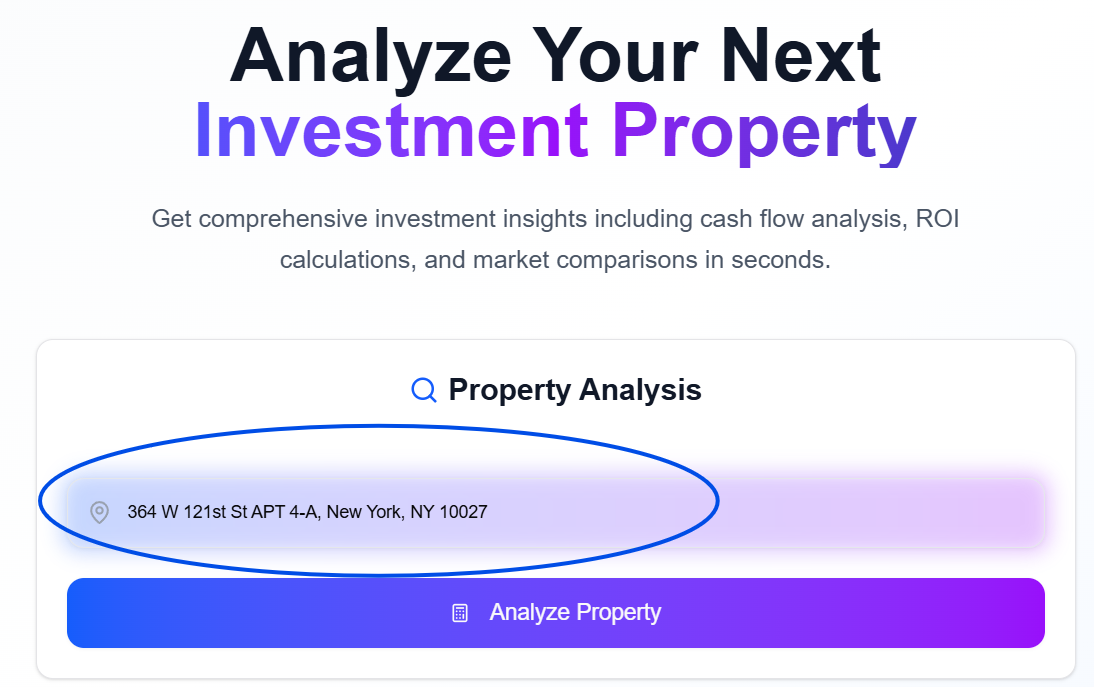
* Type the property address in the search field
* Example: "123 Main St, Los Angeles, CA" or any US property address
* The system accepts full addresses with city and state
3. **Initiate Analysis**
* Click the "Analyze Property" button
* The AI will process the property data in real-time
Each property analysis uses one credit from your available balance. Make sure you have sufficient credits before starting an analysis.
#### How to Analyze a Property:
1. **Navigate to the Analyzer**
* Click on "Analyzer" in the main navigation
* You'll see the property search interface
2. **Enter Property Details**
* Type the property address in the search field
* Example: "123 Main St, Los Angeles, CA" or any US property address
* The system accepts full addresses with city and state
3. **Initiate Analysis**
* Click the "Analyze Property" button
* The AI will process the property data in real-time
Each property analysis uses one credit from your available balance. Make sure you have sufficient credits before starting an analysis.
 ## Understanding Your Analysis Results
### Investment Analysis Dashboard
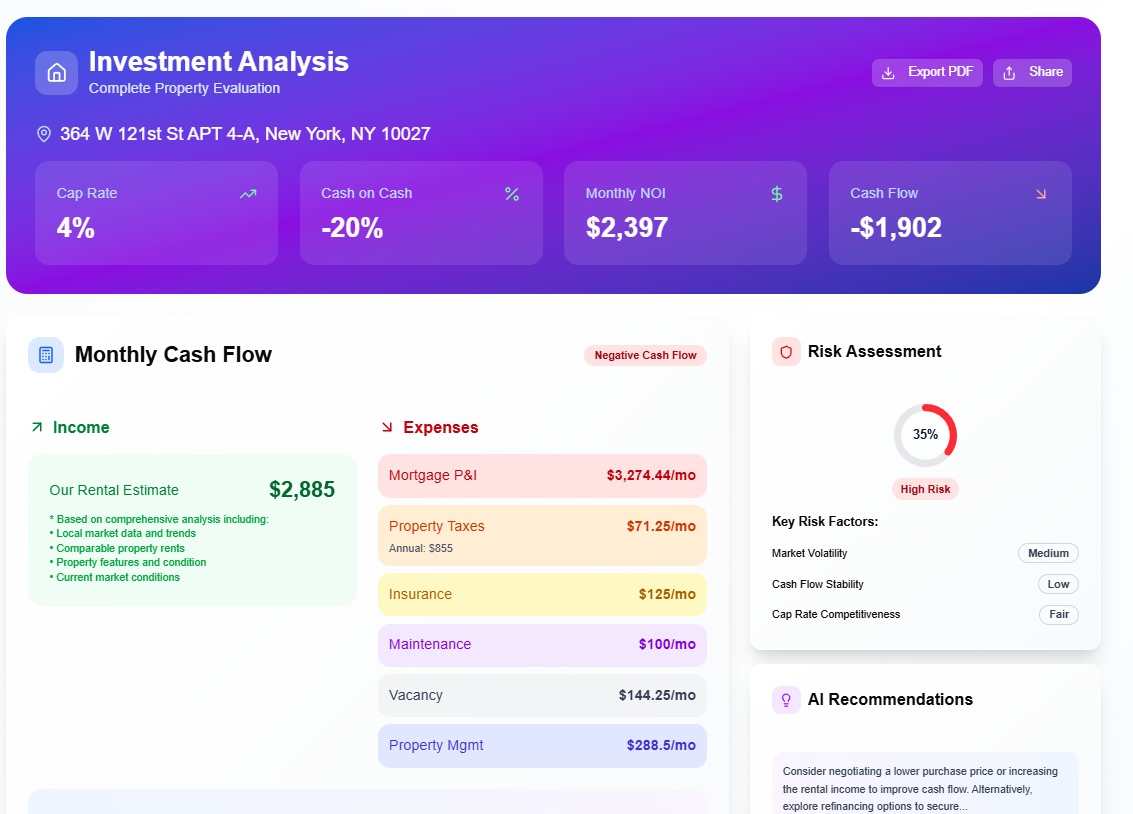
Once your analysis is complete, you'll receive a comprehensive **Investment Analysis** report that includes:
#### Key Metrics Overview
**4%** - Annual return on investment percentage
**-20%** - Return on actual cash invested
**\$2,397** - Net Operating Income per month
**-\$1,902** - Monthly cash flow (positive or negative)
#### Detailed Financial Breakdown
**Monthly Cash Flow Analysis:**
**Income Sources:**
* **Rental Estimate**: \$2,885/month
* Based on comprehensive analysis including:
* Local market data and trends
* Comparable property rents
* Property features and condition
* Current market conditions
**Monthly Expenses:**
* **Mortgage P\&I**: \$3,274.44/month
* **Property Taxes**: $71.25/month (Annual: $855)
* **Insurance**: \$125/month
* **Maintenance**: \$100/month
* **Vacancy**: \$144.25/month
* **Property Management**: \$288.5/month
#### Risk Assessment
The platform provides a comprehensive risk evaluation:
* **Overall Risk Score**: 35% (High Risk)
* **Key Risk Factors**:
* Market Volatility: Medium
* Cash Flow Stability: Low
* Cap Rate Competitiveness: Fair
#### AI Recommendations
The AI analyzes your property and provides actionable insights:
**Sample AI Recommendation**: "Consider negotiating a lower purchase price or increasing the rental income to improve cash flow. Alternatively, explore refinancing options to secure better terms."
## Understanding Your Analysis Results
### Investment Analysis Dashboard
Once your analysis is complete, you'll receive a comprehensive **Investment Analysis** report that includes:
#### Key Metrics Overview
**4%** - Annual return on investment percentage
**-20%** - Return on actual cash invested
**\$2,397** - Net Operating Income per month
**-\$1,902** - Monthly cash flow (positive or negative)
#### Detailed Financial Breakdown
**Monthly Cash Flow Analysis:**
**Income Sources:**
* **Rental Estimate**: \$2,885/month
* Based on comprehensive analysis including:
* Local market data and trends
* Comparable property rents
* Property features and condition
* Current market conditions
**Monthly Expenses:**
* **Mortgage P\&I**: \$3,274.44/month
* **Property Taxes**: $71.25/month (Annual: $855)
* **Insurance**: \$125/month
* **Maintenance**: \$100/month
* **Vacancy**: \$144.25/month
* **Property Management**: \$288.5/month
#### Risk Assessment
The platform provides a comprehensive risk evaluation:
* **Overall Risk Score**: 35% (High Risk)
* **Key Risk Factors**:
* Market Volatility: Medium
* Cash Flow Stability: Low
* Cap Rate Competitiveness: Fair
#### AI Recommendations
The AI analyzes your property and provides actionable insights:
**Sample AI Recommendation**: "Consider negotiating a lower purchase price or increasing the rental income to improve cash flow. Alternatively, explore refinancing options to secure better terms."
 ## Advanced Features
### Export and Share Options
Download a professional PDF report of your analysis
Share your investment analysis with partners or advisors
### Credit Management
* **Monitor Usage**: Keep track of your available credits in the dashboard
* **Purchase Additional Credits**: Visit the Pricing section to add more credits
* **Team Management**: Manage team access and credit allocation
## Best Practices
### Getting Accurate Results
Always include street number, street name, city, and state for best results
Cross-check the analyzed property matches your intended investment
Review the AI recommendations alongside local market knowledge
Compare different properties to make informed investment decisions
### Understanding the Data
* **Above 8%**: Generally considered good for rental properties
* **4-8%**: Moderate returns, typical for stable markets
* **Below 4%**: Lower returns, may indicate appreciation-focused investment
* **Positive Cash Flow**: Property generates monthly income after expenses
* **Negative Cash Flow**: You'll need to contribute monthly to cover expenses
* **Break-even**: Income exactly covers expenses
* **Market Volatility**: How stable property values are in the area
* **Cash Flow Stability**: Reliability of rental income
* **Cap Rate Competitiveness**: How your returns compare to market averages
## Troubleshooting
### Common Issues
* Verify the address is correct and complete
* Try using different address formats
* Ensure the property is in the United States
* Check your internet connection
* Refresh the page and try again
* Contact support if the issue persists
* Check your available credits in the dashboard
* Purchase additional credits through the Pricing page
* Contact support for credit-related questions
## Support and Resources
### Getting Help
Need assistance? Our expert support team is here to help with any questions about using the platform.
### Additional Resources
* **Community**: Join our [Twitter Community](https://x.com/i/communities/1845247324563571138) for tips and discussions
* **Blog**: Read investment insights on our [Substack](https://realdealcpa.substack.com/)
* **Documentation**: Explore our complete [API documentation](/api-reference/introduction) for integrations
## Important Disclaimers
**Investment Disclaimer**: All analysis results are for educational purposes only and should not be considered as personalized investment advice. Please consult with qualified professionals before making investment decisions. See our complete [Investment Disclaimer](/Investmentdisclaimer/Disclaimer) for more information.
**Platform Changes**: All applications and features are subject to change as we continuously improve our platform. Stay updated with the latest changes in our [Development section](/development).
***
## Ready to start analyzing your next investment property? [Access your dashboard](https://RealDealCPA.ai) and begin your analysis today! 🏡📊
title: 'New file'
description: 'Description of your new file.'
## Advanced Features
### Export and Share Options
Download a professional PDF report of your analysis
Share your investment analysis with partners or advisors
### Credit Management
* **Monitor Usage**: Keep track of your available credits in the dashboard
* **Purchase Additional Credits**: Visit the Pricing section to add more credits
* **Team Management**: Manage team access and credit allocation
## Best Practices
### Getting Accurate Results
Always include street number, street name, city, and state for best results
Cross-check the analyzed property matches your intended investment
Review the AI recommendations alongside local market knowledge
Compare different properties to make informed investment decisions
### Understanding the Data
* **Above 8%**: Generally considered good for rental properties
* **4-8%**: Moderate returns, typical for stable markets
* **Below 4%**: Lower returns, may indicate appreciation-focused investment
* **Positive Cash Flow**: Property generates monthly income after expenses
* **Negative Cash Flow**: You'll need to contribute monthly to cover expenses
* **Break-even**: Income exactly covers expenses
* **Market Volatility**: How stable property values are in the area
* **Cash Flow Stability**: Reliability of rental income
* **Cap Rate Competitiveness**: How your returns compare to market averages
## Troubleshooting
### Common Issues
* Verify the address is correct and complete
* Try using different address formats
* Ensure the property is in the United States
* Check your internet connection
* Refresh the page and try again
* Contact support if the issue persists
* Check your available credits in the dashboard
* Purchase additional credits through the Pricing page
* Contact support for credit-related questions
## Support and Resources
### Getting Help
Need assistance? Our expert support team is here to help with any questions about using the platform.
### Additional Resources
* **Community**: Join our [Twitter Community](https://x.com/i/communities/1845247324563571138) for tips and discussions
* **Blog**: Read investment insights on our [Substack](https://realdealcpa.substack.com/)
* **Documentation**: Explore our complete [API documentation](/api-reference/introduction) for integrations
## Important Disclaimers
**Investment Disclaimer**: All analysis results are for educational purposes only and should not be considered as personalized investment advice. Please consult with qualified professionals before making investment decisions. See our complete [Investment Disclaimer](/Investmentdisclaimer/Disclaimer) for more information.
**Platform Changes**: All applications and features are subject to change as we continuously improve our platform. Stay updated with the latest changes in our [Development section](/development).
***
## Ready to start analyzing your next investment property? [Access your dashboard](https://RealDealCPA.ai) and begin your analysis today! 🏡📊
title: 'New file'
description: 'Description of your new file.'